The digital landscape is important for businesses, and it’s crucial to connect with the right people, especially in business-to-business situations. That’s where LinkedIn Ads are helpful.
Unlike regular advertising platforms, LinkedIn lets you reach a special group of professionals, including key decision-makers, industry leaders, and possible partners. If you want to find new customers, share your expertise, or get people to sign up for events, LinkedIn has great tools and ad types to help you succeed.
Just running ads isn’t enough. To make the most of what LinkedIn offers, businesses need a clear advertising plan. This means understanding how to segment your audience, choosing the right kinds of ads, setting good budgets, and creating attractive messages.
In this post, we’ll look at effective ways to use LinkedIn Ads that will help you get the best ROI and create a lasting brand presence on the platform. If you’re new to LinkedIn Ads or want to improve what you’re doing now, these tips will help you get better results.
Why Should You Promote Your Business on LinkedIn?
Social media is not reaching as many people as it used to. Organic engagement is low, there is more competition, and businesses are having a hard time reaching the right people. But, LinkedIn is different.
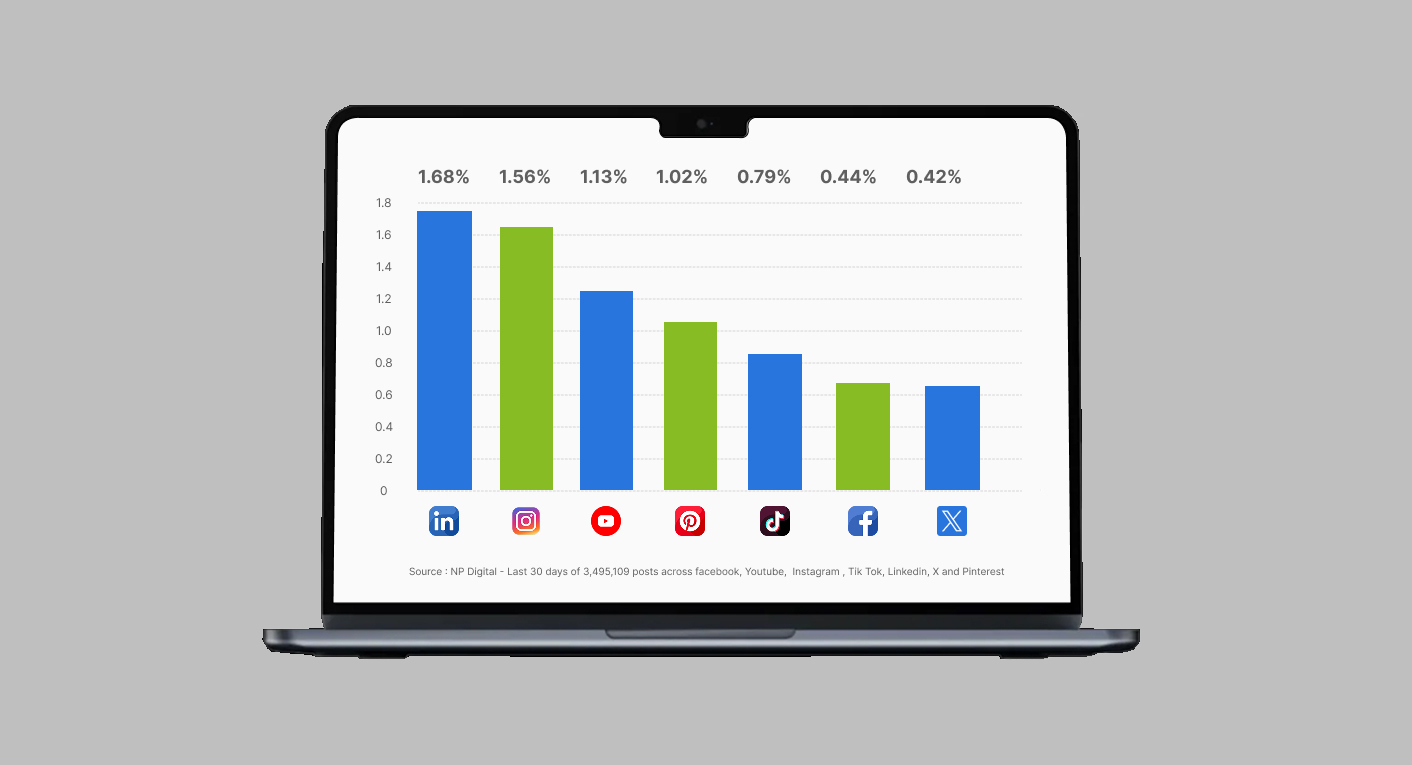
Yes, LinkedIn ads are more expensive. But they introduce you to important people. Most social media sites allow you to focus on users based on general information like age, gender, and location. LinkedIn takes targeting further.
With account-based marketing, you can identify important people in a company based on their job title, the size of the company, the industry they belong to, and specific skills they have.
This means your ads will be seen by the right people who are interested and ready to interact because they visit that place to learn, connect, and do business. Compared to other platforms where your ads could appear next to funny cat pictures and low-quality content, your brand will be displayed in a more professional setting.
It also has different types of ads, like Sponsored Content and Message Ads, better reporting tools, and easy connections to customer management systems, things that many other platforms don’t have. Let us look more into the benefits of LinkedIn ads.
Connect with Professionals
LinkedIn is the biggest website for professionals to connect, with 1+ billion users around the world. Unlike other social media sites, most of its users are professionals, leaders, and executives.
This makes a special place where businesses can reach a specific group of people. Whether you provide services to businesses, hire new employees, or share knowledge about your industry, LinkedIn helps you connect with the right people in a professional way.
This is very helpful for creating a strong brand and getting good customers. Also, LinkedIn’s algorithm shows business-related content more, which means your posts will be seen by the right people for your company. This makes it more likely for people to get involved and helps build strong business connections.
Establish Your Brand’s Trust and Expertise
LinkedIn is a great place to make your business known as an expert in your field. By regularly sharing useful information like tips, real-life examples, and updates about the industry, you show that you are knowledgeable and a leader in your field.
This helps your audience trust you and makes your brand a trusted place for information and solutions in your area. Talking with others, joining industry groups, and writing long posts can also show your company’s image.
As time goes on, being seen more helps people trust your brand and think better of your business. LinkedIn’s content tools, such as articles and newsletters, help you tell detailed stories that create stronger connections.
Get Quality Business Leads
LinkedIn is a great tool for finding new business customers. LinkedIn says that 80% of business leads from social media come from their site. This is mainly because users are thinking about business and are ready for job opportunities.
LinkedIn provides businesses with smart ways to target specific people based on their industry, job title, size of company, and other factors. This helps companies connect with the right decision-makers who are most likely to become customers.
Sponsored content, InMail, and lead generation forms make it easier to find potential customers. The platform’s lead generation forms are very effective because they automatically fill in user information.
By sharing webinars, guides, and demonstrations, you can gather potential customers while providing useful information. Unlike other platforms where people might not want to see business content, LinkedIn users actually look forward to it.
Improve Hiring and Employer Image
LinkedIn is not only for advertising products and services; it’s also an important tool for finding and attracting great workers. Companies can use LinkedIn to showcase their culture, values, and work atmosphere by sharing posts, highlighting employees, and sharing behind-the-scenes content.
This helps create an attractive reputation for the company that appeals to people looking for jobs. With tools like Company Pages and LinkedIn Jobs, businesses can easily share job openings with specific people based on their skills, experience, and where they live.
LinkedIn lets current workers help promote the company by sharing news and joining conversations. This natural visibility boosts trust and makes the company more attractive to job seekers. Also, LinkedIn’s recruiting tools offer strong data to improve job campaigns and monitor their success.
Use Advanced Advertising Tools
LinkedIn provides useful tools for advertising that help you promote your business in a smart and effective way. With LinkedIn Campaign Manager, you can make very focused ads by choosing things like industry, job title, level of experience, and size of the company.
This helps make sure your content gets to the right people. You can choose from a variety of ads, like sponsored content, message ads, dynamic ads, and others, to fit your goals, whether you want to raise brand awareness, get leads, or increase website visits.
The platform gives you clear performance reports so you can see things like how many people saw your content, how many clicked on it, how many took action, and how well people are interacting with it.
Also, LinkedIn works well with tools like HubSpot and Salesforce, making it easy to keep track of lead generation campaigns. For businesses that care about getting a return on their investment, these tools provide great accuracy.
Reasons why LinkedIn’s ad costs are more expensive than other sites:
- Smaller groups of people who are very important. You’re not sending ads to just anyone; you’re focusing on the people who make decisions.
- Frequency limits. Making sure users aren’t overwhelmed with ads helps keep them interested.
- Good job opportunities. LinkedIn offers a great space to get noticed.
See LinkedIn as something you invest in, not just a cost. With a good plan, you’re paying for valuable actions, not just inexpensive clicks. It’s obvious: the issue isn’t if you can pay for LinkedIn ads, but if you can afford to overlook them.
Also Read: The Complete Guide to Maximizing Social Media ROI Across Platforms
Begin by Understanding Your Target Audience
LinkedIn not only provides data but also offers helpful insights. It helps you target accurately. LinkedIn gives very detailed reports compared to other platforms. It includes information about the audience, how people interact with ads, and even details about website visitors.
This is important information that helps create very effective targeting options. LinkedIn’s ability to target people is the best. You can effectively reach the right people by understanding job titles, industries, and how fast companies are growing.
It’s useless to have all that ability to target people if you don’t know how to find your audience on the platform. Here’s how to do it.
Evaluating Current Customers
Before you start making an ad, take some time to think about who your perfect customer is. One of the best ways to do this is by making a buyer profile. You can look at your current and past customers for help.
You can create different buyer personas to reach various kinds of customers. This means examining and studying certain things to find similarities or shared traits between them, like:
- Location
- Industry
- Job title or position
- Company type
- Size of the company
- Financial situation and how fast it is growing
Finding Important Traits
After making your buyer personas, you can look at the LinkedIn profiles of people who match them to find similar traits they share. Here are some important qualities that can help you understand your potential customers better and improve your ad targeting:
- Demographics (age, gender, education level)
- Work history and skills
- Hobbies
- Device usage
- LinkedIn activity level
Categorize Your Audience
Want to improve your marketing? Try segmenting your audience into smaller groups. Segmentation helps you customize content and ads based on the needs of different groups of people.
This method helps make sure that each message connects with the right person, which can significantly improve engagement and return on investment. For example, you could divide your customers into groups by:
- Hobbies
- Demographics
- Previous purchases
- Search data
You can also divide people based on their interests and how many there are. Doing regular A/B testing with different groups, running similar campaigns but with slight differences, can help you understand what each group needs better.
Find What’s Working for Your Competitors
By looking at what your competitors do, you can find out which methods work best and use those ideas for yourself. Want to see what your competitors are doing? Check out LinkedIn’s Ad Library to get a look at their ads.
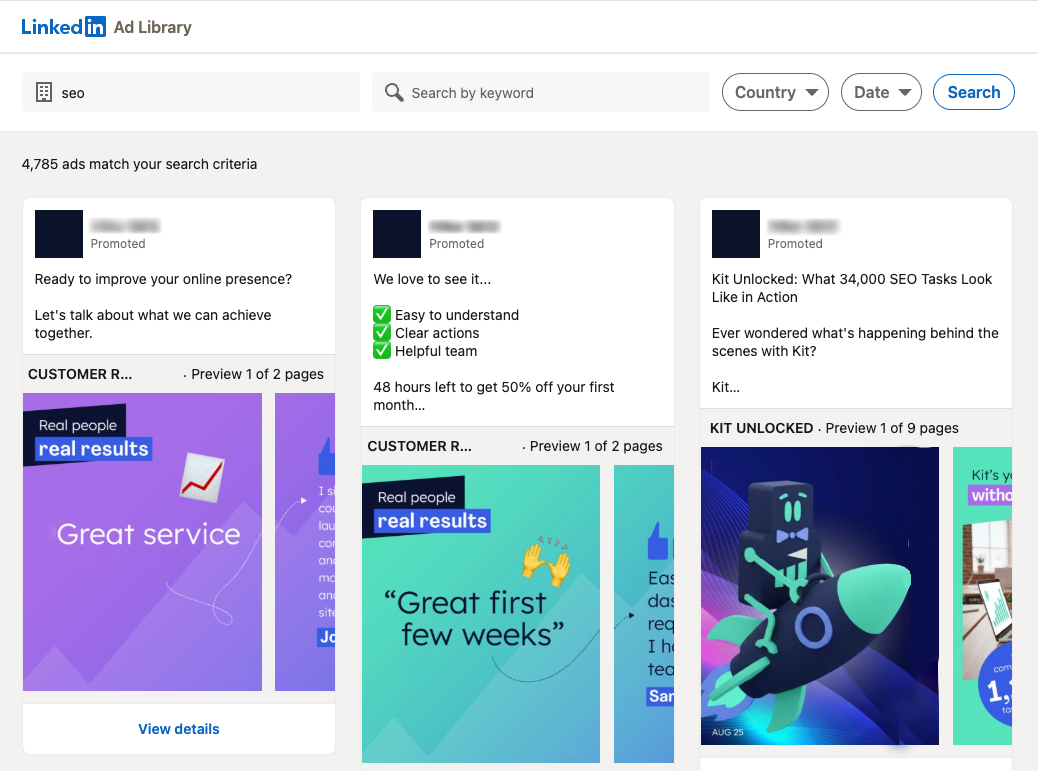
The LinkedIn Ads Library is a public database where you can find ads that have been shown on LinkedIn. It’s a useful tool for making your own advertising plan. Begin by making a long list of your competitors. Make a spreadsheet to stay organized.
Next, visit the LinkedIn Ads Library and search for each one. You can look for ads using keywords. Checking out your competitors’ ads can help you see how to create your own marketing or find new and unique ideas.
You can use tools like Semrush to see what ads your competitors are using. Websites like AdSpyder and BigSpy give information about your competitors’ ads, so you can keep track of trends.
Social listening is a good way to see what your competitors are doing on LinkedIn. Services like Sprout Social and Brandwatch can help you see how people interact with your competitors’ ads.
Another possible strategy is to use LinkedIn Sales Navigator to check if competitors have hired paid media specialists recently, which indicates they are concentrating on advertising. This can help you find specific competitors to look into more closely.
You can also discover what your competitors are doing by pretending to be one of their customers. Visit their LinkedIn profiles, click “follow,” and then look at the ads that show up on the site. You can click on their ads to see if you get different ads later because of a retargeting plan.
Stay Relevant with Social Trends
Trying to guess what your audience is interested in is not helpful. Focus on topics they already find interesting. To get more people to interact with your LinkedIn ads, begin by noticing what’s popular in social trends.
By using trends wisely, you can take advantage of what’s already popular. But don’t follow every trend. Concentrate on the ones that matter to your field and your audience. A good ad that fits with changes in the industry, recent news, or important issues shows that your brand knows what’s going on.
The important thing is to connect that to content that shows off what your organization is good at, what you offer, or what is valuable, and that is easy to share. Consider information backed by data, strong viewpoints, or stats that get people talking.
When done well, these ads not only get more people to see them but can also make a lot of money. Not sure how to begin? Try using tools like Google Trends, AnswerThePublic, or Exploding Topics to find popular topics.
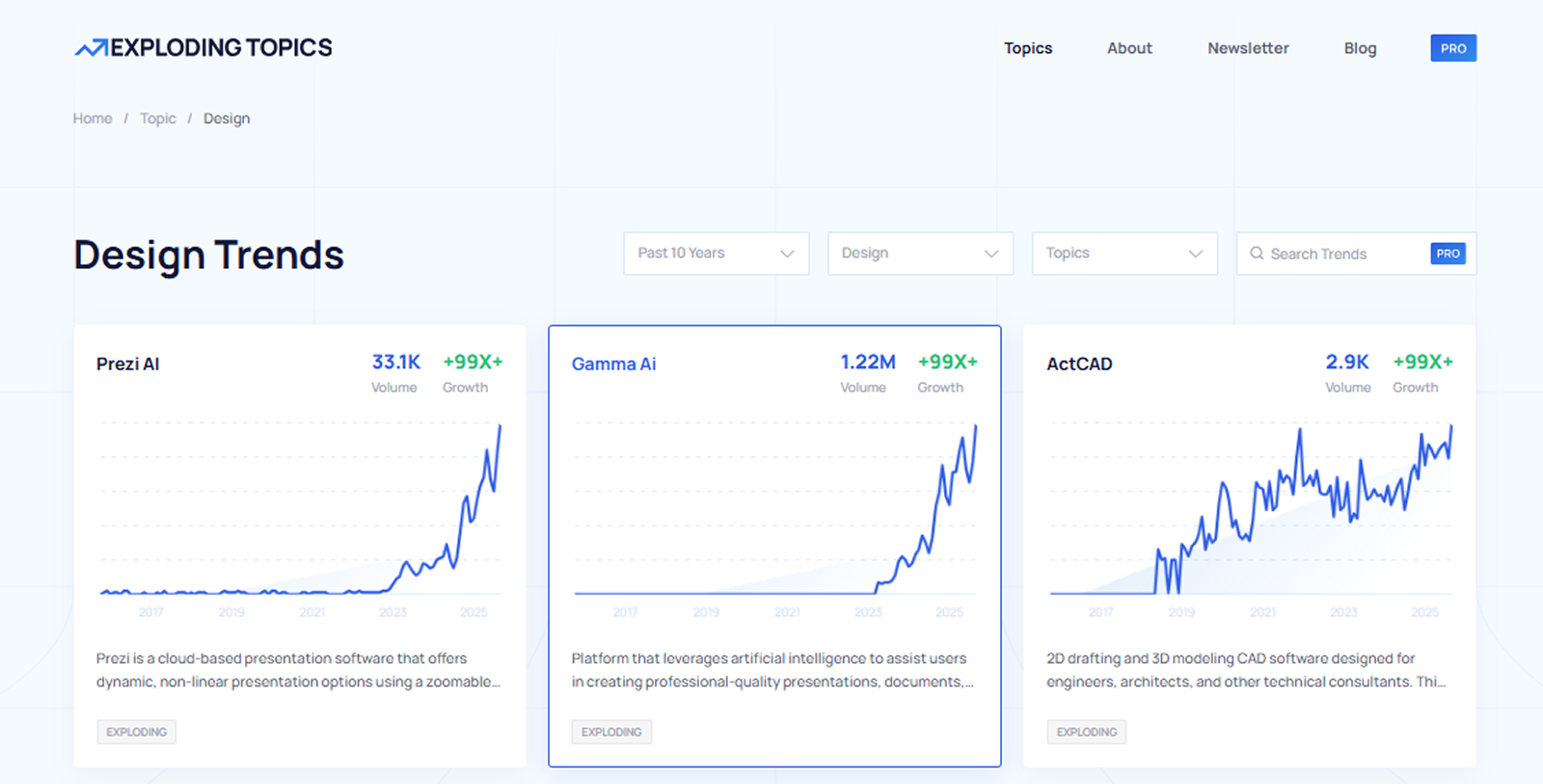
Create LinkedIn ads that link your product to what people are already looking for. The more naturally you join the conversation, the better you can connect with others and the less you will spend on ads.
Also Read: 11 New Social Media Platforms Marketers Shouldn’t Ignore in 2025
Assign Your Key Performance Indicators
Since LinkedIn ads can be pricey, it’s important to ensure you’re effectively getting conversions and leads. Setting KPIs is a crucial part of tracking how well you are doing and figuring out where you can make changes to do better.
Whether you own a small business or work in a big company, using the right key performance indicators can really help you make progress and succeed. Here are some key measurements you should check for good LinkedIn ads.
Engagement Rates
If you’re using online ads, engagement rates show how well your message is working and if people are connecting with it. High engagement rates show that your ads are effective, allowing you to plan future campaigns to get the most return on your investment.
The average engagement rate for a single-image ad is below 2 percent, but this can change for different types of ads and industries.
You can find out what people like by trying different types of ads and checking what is successful. The more you interact with your ads, the less you pay for each result. This means you get more value for your advertising money.
Page Views
These numbers show how many times people have looked at your LinkedIn page over a certain period. Page views don’t count ads, but ads can help get more people to visit your LinkedIn page.
A good place to see your LinkedIn information is on your campaign manager page. However, tools like Hootsuite, Buffer, and SocialPilot can give you a clear picture of your LinkedIn data. These tools help you understand what content is doing well and allow you to make smart choices about future content.
Video Views
Video is a great way to get people’s attention. This format attracts many different groups of people and might be a more effective way to share your message with some audiences than regular content.
So, how many times people watch a video is really important for both creators and companies. In today’s world of online media, getting regular video views can help you be seen more on social media.
For a video to be counted as viewed, a person needs to watch it for at least two seconds straight, and more than half of the video must be visible on the screen. Create a sense of interest, so that the user is intrigued about the contents of the video and wants to watch it completely.
Post Views
These views indicate that someone has seen your post in their feed. You can see your stats in detail by visiting your business’s LinkedIn page online. However, just because someone has seen your post on LinkedIn doesn’t mean they actually read it.
If not many people are seeing your posts, there are many ways to get more views. Try out different subjects and lengths for your posts. Creating a catchy idea or interesting point can help attract more viewers.
Don’t only share on your organization’s LinkedIn page. Getting the leadership team and other employees to share posts often can help more people notice and learn about your brand.
Click-Through Rates
These show how well web ads are doing. They find out how many people clicked on an ad or link compared to all the people who saw it. To get the best results, keep an eye on how many people click on your links over time.
This way, you can spot any changes in what customers do or trends in the market that might impact how well you’re doing. Research shows that the average click-through rate for paid content on LinkedIn worldwide is between 0.44% and 0.65%.
But these can be different based on the kind of ad. The B2BHouse.com LinkedIn Benchmarks show these percentages:
- Sponsored content (one picture): 0.56%
- Sponsored content (carousel): 0.40%
- Sponsored video content: 0.44%
- Message ads: 3% of responses, and 30% of open rates
- Document ad: 0.43%
- Event ad: 0.55%
You can also look at this information based on the industry, location, and job level of the LinkedIn member. This will help you understand how well your content is performing.
Impressions and Reach
Impressions show how many times people see a post or profile in their feed. You can get impressions on posts, stories, profiles, and ads. Every time one of your ads shows up in the home feed, it makes an impression.
Reach tells you how many different people see your content or profile in their feed. It’s the total number of people who can see your ads in their home feed. Making your page more popular helps more people learn about your brand and gets more potential customers to interact with you.
Conversion Rates
Your conversion rate is the percentage of people who click on your LinkedIn ads and then do something, like sign up or buy, when they get there. It could be buying something, clicking to learn more, or joining a newsletter.
Understanding your conversion rate helps you improve your ads to get more people interested and build stronger brand loyalty. What should your conversion rates be on LinkedIn?
Based on the B2BHouse guidelines we mentioned before, a good range is between 5% and 15%. Many of the differences come from how each company defines conversion. It could be completing a form or pressing a button.
To check how well your ads are doing and see your return on investment, you can visit LinkedIn’s campaign manager. You can also see your views, clicks, leads, and other important information here.
Cost Per Click
CPC shows how much you are spending to get new customers. If it’s more than you planned, you can change things to stay within your budget. To find CPC, take the total money you spent on your campaign and divide it by the number of conversions you got.
For example, if you spent $500 on a campaign and got 10 sales, each sale would cost $50. Remember, a low cost per click is not very helpful if you’re not getting good leads. You can use a calculator if you want to figure out your CPC.
Match the Content and Ad Types
You have the targeting right, now make sure the message is effective. The success of LinkedIn ads isn’t only about who you’re trying to reach; it’s about the way you reach them. Each type of ad needs a plan that talks directly about what your audience cares about and the problems they face.
For paid posts, create exciting stories with a catchy start that grabs attention. Image ads should have attractive pictures and strong headings that quickly show what makes your product valuable.
For video ads, motion graphics need to share information in 30 seconds or less. Text ads need clear and precise writing, every word is important. Dynamic ads make the experience unique for each person, so create messages that sound like a friendly chat.
Make sure your content matches your main goal of getting people to take action. Follow the best practices for each type of ad to have maximum visibility. Now let’s look more closely at the main types of ads.
Sponsored Content Ads
Sponsored content helps you connect with an audience that is very interested in what you share on LinkedIn. These ads are a helpful way to do social advertising, especially if you want the right people to see your marketing materials. There are different kinds of sponsored content ads, which can be divided into:
Single image ads: These ads have just one picture and are an easy and effective way to connect with the people you want to reach.
Carousel ads: These ads show a series of cards you can swipe through. You can show different offers or products to give useful information to your audience.
Video ads: These can be shared as paid posts or through your campaign manager on LinkedIn.
It’s important to follow the best rules for LinkedIn ads when running any Sponsored ad campaign. To be successful, you need to have at least one clear goal for what you want people to do, whether it’s big or small.
This helps you figure out how to gather leads after someone interacts with your content to get the best value from your investment.
Text Ads
LinkedIn text ads appear on the right side or at the top of your feed and can help you connect with important people in your field. They are simple to create, and besides aiming at the right audience, you just need to concentrate on the text and pictures.

Luckily, it’s easy to try out different versions of this ad, and you can use A/B testing to find the best one. When set up correctly, text ads can work really well. But they cost a lot to operate.
LinkedIn can charge more for ads than regular social media sites because it mainly focuses on B2B customers who can pay those higher prices. Also, LinkedIn doesn’t have as many advertisements as social networks like Facebook and Google.
If you want to make a text ad, you need to make sure you’ll make back the money you spent. LinkedIn has some helpful tips, such as:
- Add a picture to make your ad more eye-catching
- Talk directly to your audience
- Make a few different ads for each campaign
Video Ads
LinkedIn focusing on videos is not by chance. People interact with videos five times more than with regular posts. Brands that don’t use videos are missing out on a big chance. The facts are clear: Video on LinkedIn is doing much better than other types of ads.
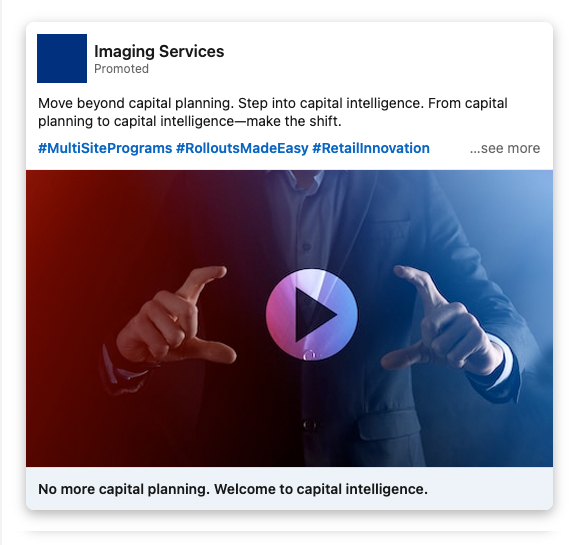
People spend three times more time watching videos than looking at other content. Short videos are very effective and can reach 32.18% more people. The perfect length for videos has changed over time.
In 2020, short videos were about 13 seconds long, but now they are around 44 seconds. Maybe our attention spans aren’t as short as people think. Marketers need to make clear and strong videos that quickly deliver their message.
Write Ads That Make People Take Action
Good and interesting ads are important to help more people notice your brand, get potential customers, and increase sales. Here are some tips for writing good text in LinkedIn ads:
- Make it easy to understand and related: emphasize how your product or service can help your audience
- Point out any special benefits or strengths you have that make you better than your competitors
- Make sure your headline is eye-catching and shows what makes it unique compared to other ads
The rules for LinkedIn ads say that for paid content you should:
- Make sure headlines are under 150 characters long
- Keep descriptions to 70 characters or fewer
- Include a maximum of five ads for each campaign
Your call-to-action is the key moment that connects getting people interested to actually getting them to take action. On LinkedIn, your call to action should be clear and interesting enough to make people stop scrolling and take action.
LinkedIn gives advice for calls to action, but the words you use will change depending on the type of ad and what you are promoting. Many CTAs use metaphorical words like “unlock,” “discover,” or “accelerate”.
However, the best CTAs use clear, urgent words that show a specific action, like downloading a guide or signing up for an event. Even basic calls to action like “Learn more” can be effective if the ad is convincing enough.
Make Stunning Pictures and Graphics
Eye-catching images can mean the difference between people quickly scrolling by or actually clicking on something. Making eye-catching visuals isn’t just about how they look, it’s about clearly sharing important ideas that grab attention right away.
Keep in mind that every part of your design should encourage your audience to do something. Here are some easy tips for making great visuals for your LinkedIn ads:
- Make it easy. Pick one color scheme or picture style to use in all your ads. This helps people recognize the brand and keeps the visuals looking similar.
- Use clear, eye-catching pictures that grab attention instantly. Consider what kind of picture would attract potential customers, maybe something bright, lively, or a little bold.
- Make it funny. Make your pictures funny, and you might get more people to click on them.
- Use pictures that encourage and inspire people, or share stats and reviews that show your brand is trustworthy.
- Use LinkedIn’s recommendations for ads and make sure your images are 1200 x 627 pixels in size.
- LinkedIn suggests using bigger images instead of small ones.
Monitor Results and Optimize Accordingly
Like any advertisement, it can be hard to get people to buy from you immediately, especially if they don’t know your brand. Marketing experts believe that people need to see something 7 times before they take action.
Don’t expect to make sales right away, especially from people who don’t know your brand. Every click gives you information that can help improve every potential customer. How? With the help of LinkedIn’s Conversions API (CAPI).
By linking your own marketing data safely with LinkedIn, you can get a complete look at how your ads are doing. You can track online actions like clicks and downloads on different devices and browsers, as well as offline activities like phone sales.
This helps you collect information so you can change your ads, like their content, style, how often they appear, and other things to get more sales and make the most money from your investment. Pay special attention to creativity.
Creativity is the most powerful tool you can use to improve performance. If you don’t regularly check and improve your creative work, you’re missing out on making more money. CAPI helps keep your privacy safe on LinkedIn for both users and advertisers by eliminating cookie tracking.
It also gives you control over what information you want to share with the platform, and when and how to share it. Using CAPI has great advantages: it can lead to a 31% rise in the number of conversions and a 20% drop in the cost for each action. Improving your ads over time will help you get better results as more people see your brand.
- Test out different texts and pictures in your ad to find out what gets the most attention.
- Update your calls to action and landing pages. This will help you understand what your audience likes most and where you get the best results.
- Try making phone calls to people who sign up to see if you can turn them into customers, instead of just using automated messages.
- Create a webinar or PDF to attract new customers by teaching them about your business and how you can assist them.
Wrapping Up
Getting good at LinkedIn Ads involves more than just starting campaigns; it means making a smart plan that fits your business goals and can last over time. By knowing your audience, picking the right types of ads, improving your content, and regularly checking how well you’re doing, you can make LinkedIn a strong way to grow your business.
Keep in mind that doing well here doesn’t always happen right away. LinkedIn is a work-related website where trust and value are important. Your campaigns should focus on the future.
They should provide useful information, create strong connections, and show that your brand is a leader in its field. By putting in regular work and making smart improvements, LinkedIn Ads can help you get good leads, make your brand more visible, and show clear results for your business.
As more companies use online platforms, businesses that carefully use LinkedIn Ads will have a big advantage. Use the tips in this post not just to promote, but to connect and build relationships with the people you want to reach.
FAQs
What sets LinkedIn Ads apart from other social media ads?
LinkedIn Ads are special because they focus on reaching working professionals. Unlike Facebook or Instagram, where people usually look at things for fun, LinkedIn users are usually serious about growing their businesses. This way of thinking makes LinkedIn great for business-to-business advertising, finding valuable leads, and hiring new employees. Its targeting abilities are special, letting advertisers find users based on their title, size of the company, industry, level of experience, and even specific companies.
How much do LinkedIn Ads cost?
LinkedIn Ads usually cost more for each click or view than ads on Facebook or Google. Prices change depending on things like how many people see the ad, how relevant the ad is, how much competition there is, and how you decide to bid. You can choose a total budget for the entire campaign, a daily budget, or set your own bid. Most advertisers pay between $5 and $10 for each click, but this amount can change based on the industry.
What is Lead Gen Form and how does it function?
LinkedIn’s Lead Gen Forms make it easier to get leads by automatically filling in user details from their LinkedIn profiles. When someone clicks on your ad, a form appears with some information already filled in, like their name, job title, company, and email. This lowers resistance and makes it easier for people to take action compared to regular landing pages. They are great for downloading content, signing up for demos, or registering for events.
Should I choose automatic or manual bidding for LinkedIn Ads?
Both automatic and manual bidding can work well, depending on what you want to achieve with your campaign and how much money you have to spend. Automated bidding helps LinkedIn adjust your bid to achieve the best outcomes within your daily budget. It’s great for beginners or anyone looking to reach more people. Manual bidding allows you to have more control over how much you want to pay for each click or view.
Can LinkedIn ads work well for small businesses or startups?
Yes, LinkedIn Ads can definitely work well for small businesses, especially for those selling products or services to other businesses. Even though the platform has more expensive ads, you can get a much better return on your investment because the leads are of higher quality and you can target your audience better. Small businesses can begin with a small budget and use ads or sign-up forms to try out their marketing campaigns. Ads that clearly show a specific problem and solution usually do well.